UX Case Study · University Library Systems
Role
UX Designer
Duration
8 Weeks
Tools
Figma, FigJam
Type
Personalized Dashboard

Overview
LibraryOS reframes the university library from a static catalog into a personalized learning companion. The product helps students discover relevant resources, manage borrowed materials, track research progress, and get support without navigating fragmented services.
The case study focuses on clarity, discoverability, and decision-making speed. Each screen is structured to make the next action obvious while keeping the interface calm enough for long study sessions.
Problem
Students were not failing because they lacked motivation. They were losing time to scattered services, unclear terminology, and interfaces that did not adapt to their intent.
Search-first discovery
Students must know exactly what keywords to search before they can find relevant books, journals, or databases.
Fragmented library tasks
Renewing loans, booking study rooms, and requesting books are spread across multiple pages and systems.
Low long-term engagement
Students often use the library only when assignments are due, with little encouragement to return or build consistent study habits.
Hidden librarian support
Many students are unaware that librarians provide research guidance beyond basic circulation services.
Overdue reminders arrive too late
Due dates are easy to miss, creating unnecessary stress, fines, and last-minute renewals.
Manual citation workflow
Creating citations requires switching to external tools or manually formatting references outside the library experience.
Poor first-time experience
New users receive little guidance or personalization, making it difficult to discover relevant resources from the start.
Librarians spend time on repetitive queries
Routine questions about renewals, room bookings, and catalog navigation reduce the time librarians can spend supporting research.
Discover relevant resources without relying on perfect keywords
Complete common library tasks with minimal effort
Access research support when they actually need it
Feel confident managing their academic resources and deadlines
Personalize Resource Discovery
Recommend relevant books, papers, and databases based on courses, interests, and research goals instead of expecting students to know exactly what to search for.
Simplify Library Tasks
Bring borrowing, renewals, room bookings, requests, and citations into one connected workflow to reduce unnecessary navigation.
Make Research Support Visible
Help students easily discover librarians and provide AI-assisted support for routine questions, while making expert help available when needed.
Build Confidence Throughout the Journey
Clearly communicate availability, due dates, recommendations, and next steps so students always know what to do next.

Competitive Analysis
Reviewed university library websites and digital library platforms to understand common approaches to search, navigation, borrowing, and account management.
Literature Review
Explored research on information-seeking behaviour, academic support, and digital library usability to better understand how students discover and use learning resources.
Heuristic Evaluation
Evaluated existing library interfaces using usability heuristics to identify opportunities to improve discoverability, navigation, feedback, and task efficiency.
Final Design
Each screen addresses a different part of the library experience—from discovering resources to managing loans and getting research support.

Design Focus: Help students discover relevant resources without already knowing what to search for.
What Changed
Introduced a student-focused landing page instead of a catalog-first experience.
Used plain language to explain key features.
Positioned personalization as optional, not required.
Design Principle Applied
Clarity before complexity.
Design Focus: Collect enough information to personalize the experience while keeping setup short and transparent.
What Changed
Asked for academic program and interests first.
Explained why each question was being asked.
Allowed users to skip onboarding and update preferences later.
Design Principle Applied
Personalization should be earned through transparency.


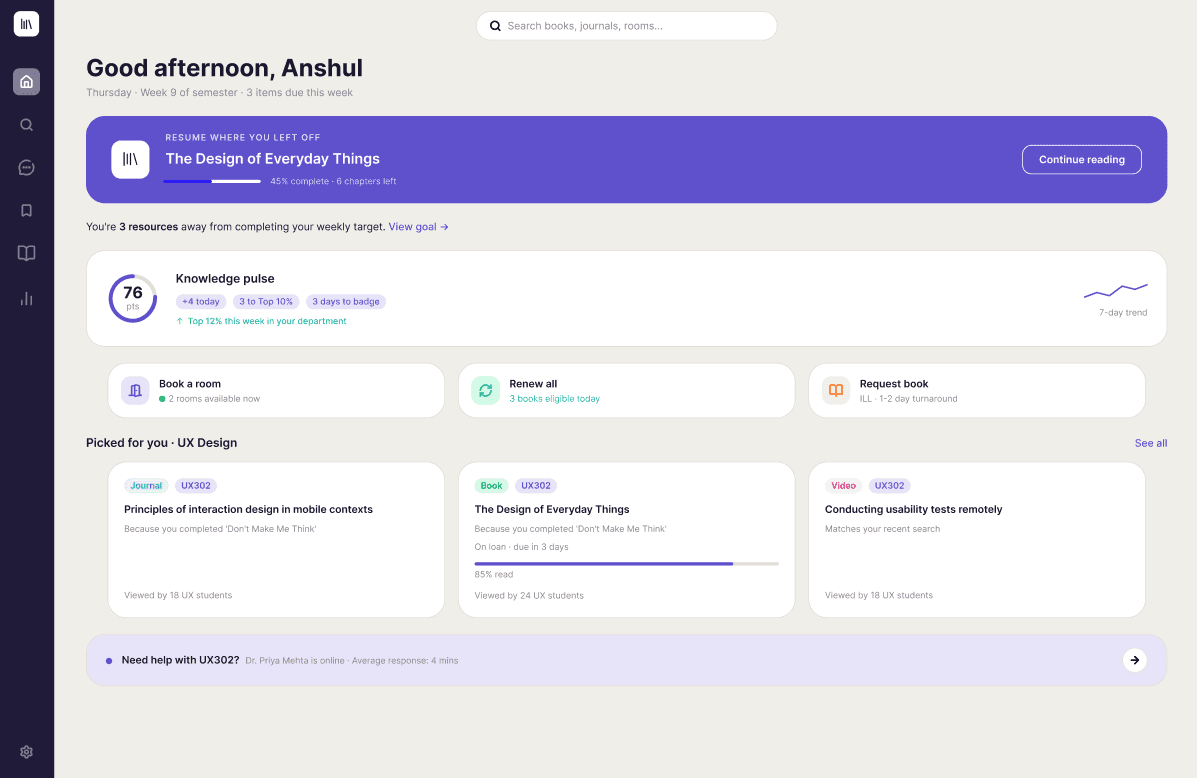
Design Focus: Bring the most relevant information into one place so students know what to do next.
What Changed
Combined recommendations, due dates, and recent activity on one dashboard.
Prioritized information based on relevance rather than chronology.
Added lightweight progress indicators to encourage continued engagement.
Design Principle Applied
Make the next action obvious.
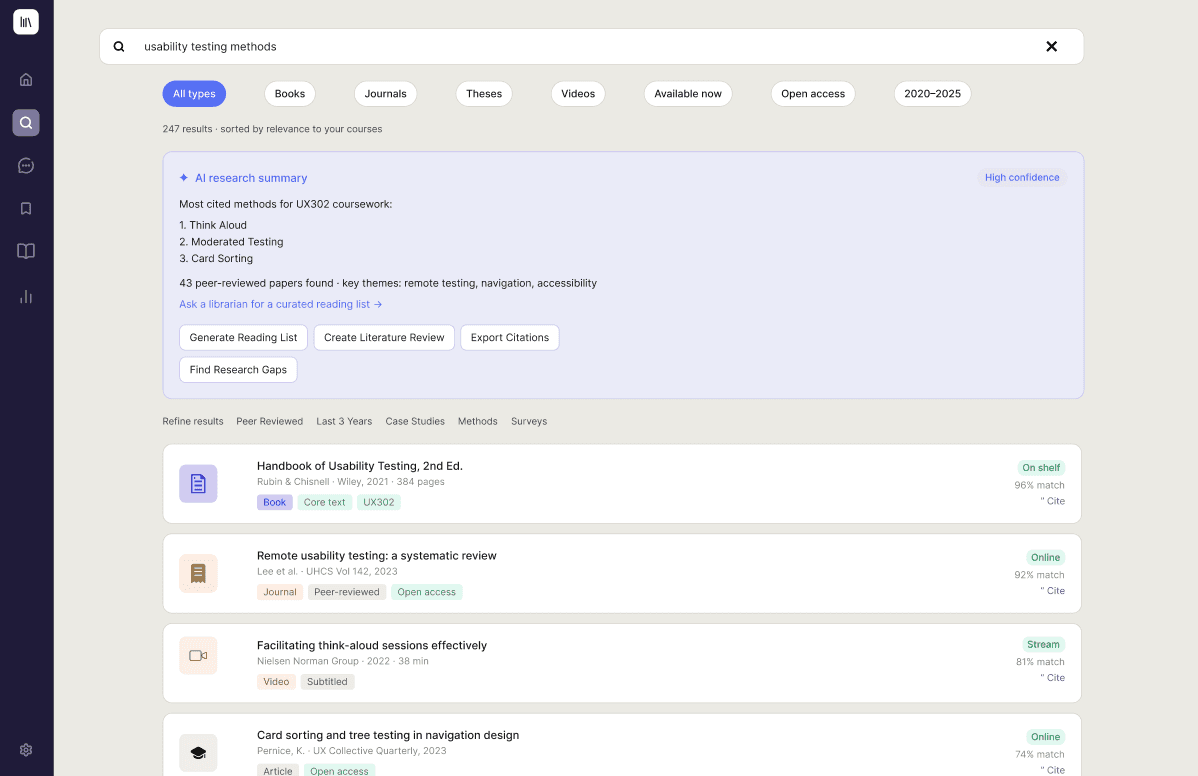
Design Focus: Support both exploratory and targeted search without increasing interface complexity.
What Changed
Combined natural-language search with traditional filters.
Added short AI-generated summaries to help users evaluate results.
Kept citations, availability, and saving actions close to each resource.
Design Principle Applied
Guide users before asking them to refine.

Design Focus: Reduce friction in common library tasks.
What Changed
Brought borrowing, renewals, room bookings, and requests into one workspace.
Highlighted time-sensitive actions first.
Simplified task labels using student-friendly language.
Design Principle Applied
Reduce effort for frequent tasks.
Design Focus: Help students stay aware of their learning without making progress feel like a requirement.
What Changed
Visualized reading activity and personal goals.
Surfaced recent achievements instead of overwhelming users with statistics.
Connected progress to ongoing study, not streaks or comparison.
Design Principle Applied
Encourage consistency, not pressure.


Design Focus: Make research support easier to discover.
What Changed
Added a persistent entry point for research help.
Introduced subject-based librarian recommendations.
Used AI to answer routine questions while keeping access to librarians visible.
Design Principle Applied
Human support should always feel accessible.
Problem
Design Decision
Finding relevant resources required knowing the right keywords.
Added course-aware recommendations and relevance explanations to support discovery.
Library information was spread across multiple pages.
Consolidated due dates, holds, saved resources, and quick actions into a personalized dashboard.
Research support was difficult to discover.
Made librarian assistance persistent and introduced subject-specialist recommendations.
Common library tasks required unnecessary navigation.
Unified borrowing, renewals, room booking, and requests into a single workflow.
Research workflows lacked continuity.
Introduced progress tracking, saved-resource collections, and contextual reminders to support ongoing work.
Students
Easier discovery of relevant academic resources.
Clearer visibility of library tasks and due dates.
Greater confidence while navigating the research process.
Librarians
More visibility for research support services.
Fewer routine administrative questions.
More time available for in-depth research assistance.
Universities
Better utilization of existing library resources.
A more cohesive digital library experience.
Stronger support for independent student learning.
Future Scope
If this concept were developed further, I would:
Conduct usability testing with university students to validate key design decisions and identify areas for improvement.
Evaluate accessibility with screen-reader users and refine the experience against WCAG guidelines.
Integrate campus LMS platforms to deliver more relevant, course-aware recommendations.
Measure search success, recommendation quality, and support usage through product analytics.
Explore collaborative features such as shared reading lists and study groups.
Designing LibraryOS shifted my perspective from improving individual screens to improving the entire student journey. Rather than adding new functionality, I focused on reducing friction across common tasks like discovering resources, managing loans, and finding research support.
One of the biggest lessons from this project was that good UX isn't just about making interfaces efficient—it's about helping users feel confident. Small decisions, like using clearer language, surfacing important information, and providing guidance at the right moment, can make complex systems feel approachable.
Usability Testing
Conduct task-based usability sessions with university students to validate key workflows and identify usability issues.
Accessibility
Evaluate the experience against WCAG guidelines and test with keyboard and screen-reader users.
Integrations
Explore integrations with university learning platforms and library systems to make recommendations more relevant and connected to students' coursework.